Mastering Pinterest SEO is the single most effective way to generate compounding, high-intent organic traffic to your website without spending a dollar on paid ads. Unlike fast-decay social media feeds like Twitter or Instagram where posts disappear within hours, Pinterest is a visual search engine powered by machine vision and intent-based keyword indexing. High-ranking Pins consistently drive qualified traffic for months—and often years—after publication.
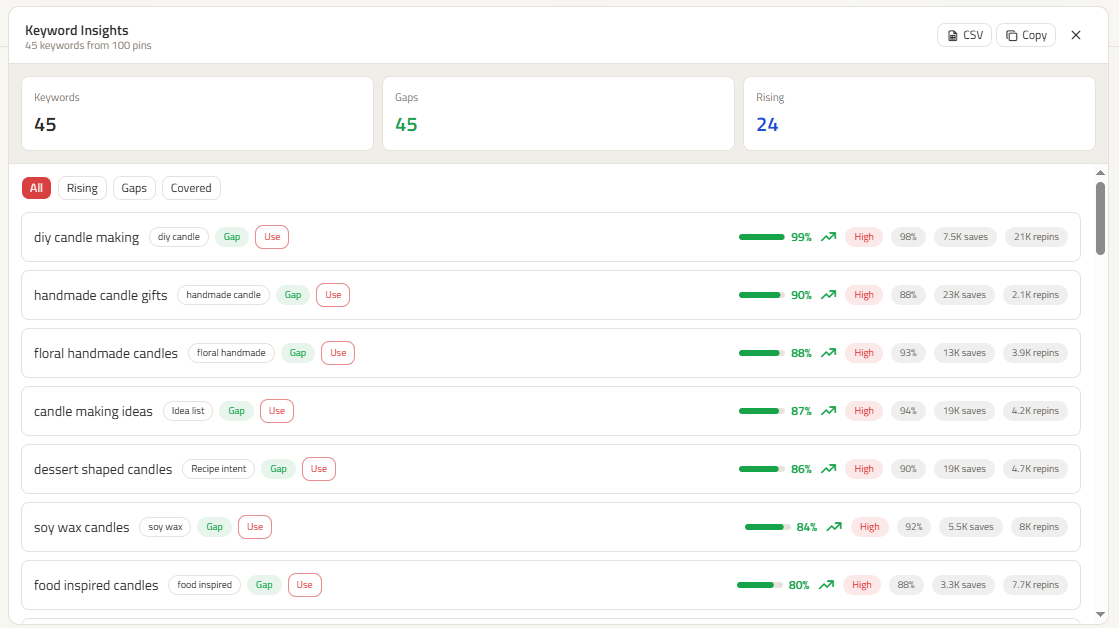
In this guide, we break down the 2026 Pinterest search algorithm, visual entity recognition, and the exact step-by-step workflow to rank your Pins in top search positions using ClickToPin's integrated keyword discovery engine.
Key Takeaways: 2026 Pinterest SEO Rules
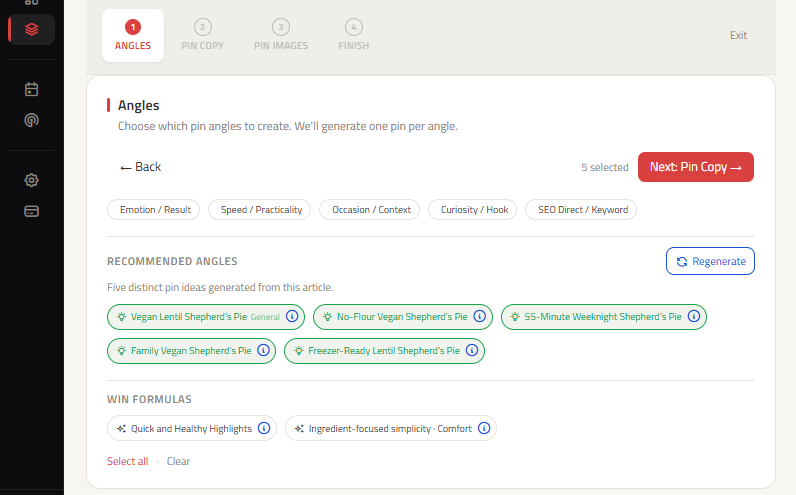
- ✓Visual OCR Indexing: Pinterest scans text directly on your 2:3 image canvas—place your exact search hook in clear, high-contrast overlay text.
- ✓3-Segment Titles: Format titles with
[Primary Keyword] + [Benefit Hook] + [Timeframe/Proof]within the first 60 characters. - ✓Board Cluster Context: Save new Pins to your most tightly themed, keyword-rich board first to establish relevance signals.
What is Pinterest SEO in 2026?
Pinterest SEO (Search Engine Optimization) is the process of optimizing your Pinterest profile, boards, and Pins with relevant search keywords, machine-readable visual cues, and high-engagement metadata so the algorithm indexes and ranks your content for specific search queries.
Because Pinterest operates as a visual discovery engine, it indexes both textual metadata (titles, descriptions, alt text, board names) and visual entities (objects, color palettes, and embedded text detected via computer vision).
| SEO Component | Where to Optimize | Algorithm Weight | Best Practice in 2026 |
|---|---|---|---|
| Pin Title | First 40–70 characters of the Pin headline | Very High | Include primary search query in a 3-segment formula with clear CTR hook. |
| Pin Description | 300–420 characters with contextual keywords | High | Write natural conversational copy containing 2–3 secondary keywords and a clear CTA. |
| Visual Entity / Overlay Text | Text rendered directly on the 2:3 image canvas | Very High | Use high-contrast legible fonts. Pinterest's OCR extracts image text for ranking. |
| Board Title & Notes | Specific niche board names and 100-word descriptions | High | Save Pins to highly relevant, keyword-optimized boards rather than generic boards. |
| Domain Authority / Claimed Site | Verified website domain in Pinterest Business settings | Critical Baseline | Claim your website domain to unlock Rich Pins and establish creator trust. |
2026 Visual Entity Recognition: How Pinterest "Sees" Your Pins
Pinterest uses a proprietary visual AI engine (powered by Pinterest Lens technology) to categorize images into semantic entities before reading your written descriptions.
[1. OCR TEXT SCAN] ➔ [2. OBJECT & COLOR RECOGNITION] ➔ [3. KEYWORD METADATA MATCH] ➔ [4. BOARD CONTEXTUAL RELEVANCE]
When you publish a Pin, the algorithm performs four simultaneous classification checks:
- Optical Character Recognition (OCR): Scans the actual text baked into your 2:3 image. If your text overlay matches the searcher's query, ranking confidence increases dramatically.
- Object & Palette Detection: Analyzes visual objects (e.g., sourdough loaf, closet organizer, running shoes) to ensure the image matches the topic.
- Metadata Alignment: Cross-checks the OCR scan with your Pin Title, Pin Description, and Alt Text to verify intent authenticity.
- Board Context: Validates that the board where the Pin is saved shares the same thematic keyword cluster.
Free Printable Resource
Download the Complete Pinterest SEO Checklist (.PDF)
Audit your business profile, boards, keyword research, 2:3 image creative, and destination landing pages with our step-by-step checklist.
Download Checklist (.PDF)The 4-Tier Pinterest Keyword Placement Checklist
To achieve top rankings in Pinterest Guided Search, apply this 4-tier keyword placement structure across every asset:
1. Primary Keyword in Pin Title
Place your exact primary search keyword within the first 50 characters of the Pin Title. Structure titles with a 3-segment formula: [Primary Keyword] + [Key Benefit or Specific Hook] + [Timeframe or Proof]. Use our Pinterest Title Generator to craft high-CTR headlines.
2. Contextual Secondary Keywords in Pin Description
Avoid keyword-stuffing comma-separated lists. Instead, draft a 320–420 character description that naturally weaves 2 to 3 related long-tail search queries into complete, engaging sentences. Conclude with an actionable directive (e.g., "Tap to read the complete step-by-step baking tutorial!").
3. Clear Text Overlay on the 2:3 Canvas
Ensure headline typography is bold, high-contrast, and positioned away from the top and bottom mobile overlay danger zones. Use our Pinterest Pin Size Guide to maintain optimal 1000 × 1500 proportions.
4. Board Alignment & Topic Clusters
Always save fresh Pins to your most specific, relevant board first. A Pin about "Easy Sourdough Discard Crackers" should be saved to an "Easy Sourdough Recipes" board before being distributed to broader boards like "Baking Ideas".
Outdated Tactics to Avoid vs. Modern 2026 Pinterest SEO
| Outdated Tactic (Penalized / Ineffective) | Modern 2026 Strategy (Rewarded by Algorithm) |
|---|---|
| Pinning the exact same image 30 times a day | Create 3–5 fresh visual variations and angles per article using Pinterest Pin Copy. |
| Stuffing descriptions with 30 disconnected hashtags | Use 2–4 hyper-relevant niche hashtags alongside natural sentence keywords. |
| Spamming massive generic Group Boards | Build tightly themed, niche-specific personal boards with keyword-rich titles and descriptions. |
| Using automated burst schedulers that dump 50 pins at once | Pace pins steadily over days and weeks using the Pinterest Content Planner. |
Frequently asked questions
How long does it take for Pinterest SEO to take effect?
Fresh Pins typically take 4 to 12 weeks to be indexed, tested across sample feeds, and gain momentum in search results. Unlike Google SEO which can take 6+ months, Pinterest indexing begins generating search impressions within weeks and compounds as users save your Pins.
What is the difference between Pinterest SEO and Google SEO?
Google SEO is primarily text and backlink-driven, prioritizing domain authority and comprehensive written articles. Pinterest SEO is a visual discovery engine prioritizing fresh image assets, clear 2:3 mobile text overlays, native board relevance, and user save velocity.
Can I rank on Pinterest without a Business Account?
While personal accounts can rank, a free Pinterest Business Account is strongly recommended because it allows you to claim your website domain, enable Rich Pins (which pull metadata directly from your site), and view detailed search impressions and outbound click analytics.