A Pinterest keyword research tool helps you discover search terms, audience intent, and trending topics on Pinterest. Instead of beginning with a generic list of blog ideas, start by researching the exact search language and related phrases that appear around your niche on Pinterest, then use that evidence to choose what to plan, create, and post next.
ClickToPin centralizes that workflow in one system: search a topic in Radar, review the keyword opportunities it extracts from live search evidence, move worthwhile ideas into Pinterest Content Planner, and structure them with a Pinterest Content Calendar Template before continuing seamlessly into article and Pin creation. It is an authenticated creator workspace, not an inflated promise of Pinterest search volume, rankings, or automatic traffic.
Explore Pinterest Search Angles & Board Taxonomy
Type any seed keyword to simulate real Pinterest search intent clusters, recommended board structures, and high-CTR 3-segment title formulas:
“handmade candles gift ideas”
Target Board: Handmade Candles Gift Guides
Suggested Title: 15 Best Handmade Candles Gift Ideas for Any Occasion (2026)
“best affordable handmade candles”
Target Board: Budget-Friendly Handmade Candles
Suggested Title: Top 10 Affordable Handmade Candles That Look Expensive
“how to start with handmade candles”
Target Board: Handmade Candles for Beginners
Suggested Title: How to Start with Handmade Candles: Simple 5-Step Beginner Guide
“easy handmade candles step by step”
Target Board: Easy Handmade Candles Tutorials
Suggested Title: Easy Handmade Candles in 15 Minutes (No Experience Needed)
“aesthetic handmade candles ideas”
Target Board: Handmade Candles Aesthetic & Styling
Suggested Title: 21 Aesthetic Handmade Candles Ideas to Elevate Your Space
“modern minimalist handmade candles”
Target Board: Modern Handmade Candles Designs
Suggested Title: Minimalist Handmade Candles: Clean Visual Inspiration for 2026
“seasonal handmade candles trends 2026”
Target Board: Trending Handmade Candles
Suggested Title: Top 7 Handmade Candles Trends You Need to Know This Season
“budget friendly handmade candles hacks”
Target Board: Handmade Candles Hacks & Tips
Suggested Title: 5 Genius Handmade Candles Hacks That Save Serious Money
Need live Pinterest search autocomplete and ranked pin extraction?
ClickToPin Radar scans real Pinterest search results, extracts keyword opportunities, and sends them straight to your Planner.
What is a Pinterest keyword research tool?
A Pinterest keyword research tool identifies the search terms, themes, and related queries people use to discover ideas, products, and tutorials on Pinterest. Unlike traditional Google SEO tools that focus strictly on text search volume, Pinterest keyword research reveals visual search intent and guided suggestions, helping you optimize Pin titles, descriptions, image overlays, and board structures for maximum reach.
Start with a business topic, not a random keyword list
Use the exact words a customer would type to discover your product, service, or article. A handmade candle brand, for example, might start with handmade candles rather than trying to guess every seasonal, gift, or ingredient phrase upfront.
Pinterest describes search as an exploration engine where people enter a starting query and use guided suggestions to narrow their intent. That makes your initial query a discovery starting point rather than a final content decision.
For each business topic, evaluate three practical questions:
- What is the core problem, project, or purchase people are trying to solve?
- Which more specific phrases represent a distinct use case, audience, or occasion?
- Which ideas match a page, product, or helpful article you can genuinely create?
This is where a dedicated Pinterest keyword tool is valuable: it gives you a repeatable method to evaluate demand before committing time to content production.
| Research Method | Data Source | Workflow Step | Best For |
|---|---|---|---|
| Pinterest Search Bar | Native autocomplete suggestions | Manual note-taking | Quick individual phrase checks |
| Pinterest Trends | Relative historical popularity index | Seasonal trend validation | Long-term planning & holidays |
| ClickToPin Radar | Live search evidence & pin extraction | Direct handoff to Planner & Workspace | Fast workflow from idea to finished Pins |
Research keyword opportunities in Radar
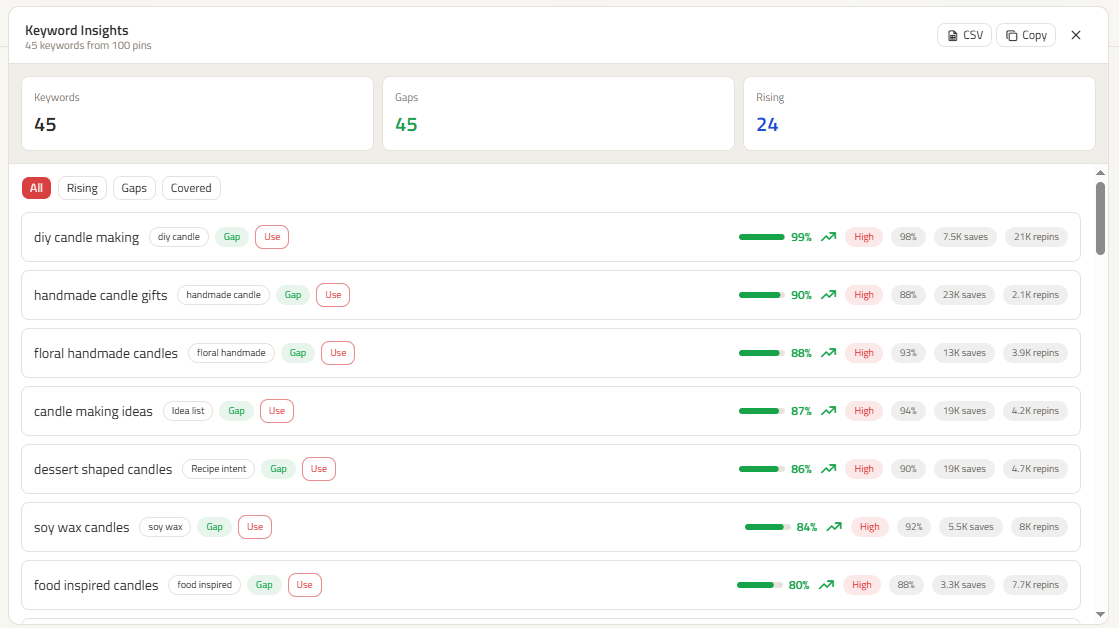
In ClickToPin, open Radar and run a live search for your starting topic. Review the keyword opportunities alongside the search context rather than treating one metric as an absolute command.

Look for phrases that answer a real customer question. For handmade candles, handmade candle gifts deserves its own gift-guide angle, while soy wax candles represents an ingredient-focused product angle. A term only belongs in your plan when it matches a useful offer, article, collection, or Pin concept.
Use your researched Pinterest SEO keywords across Pin titles, descriptions, and text overlays to provide clear context for Pinterest's visual recognition algorithm. Descriptive board titles and board descriptions also reinforce your topical authority.
Move a useful keyword into your content plan
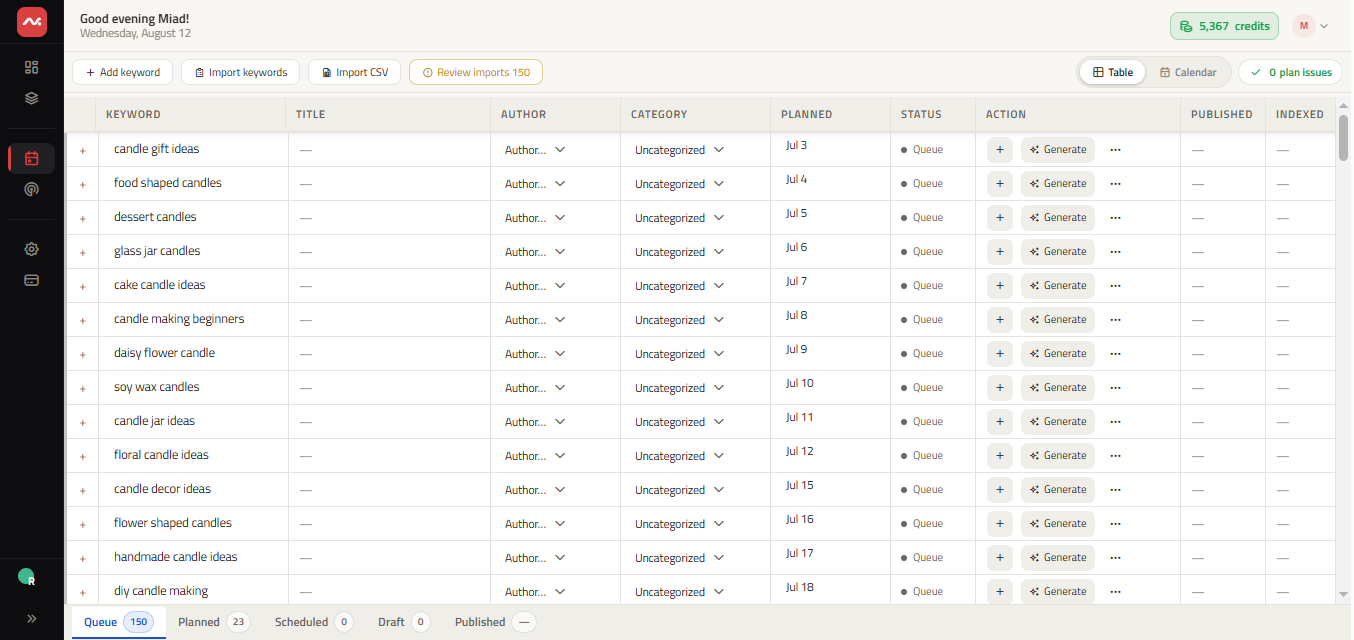
Keyword research is only valuable when it changes what you make next. When an opportunity is a strong fit, use the handoff to add it directly to your Planner. From there, give the idea an owner, category, and realistic publishing date before turning it into an article or a group of Pins.
This keeps research organized. You can collect several related phrases, select one primary topic, and avoid publishing duplicate content for minor variations. The goal is a high-value piece of content with a distinct angle, not an unwieldy spreadsheet.
Turn the plan into Pins people can click
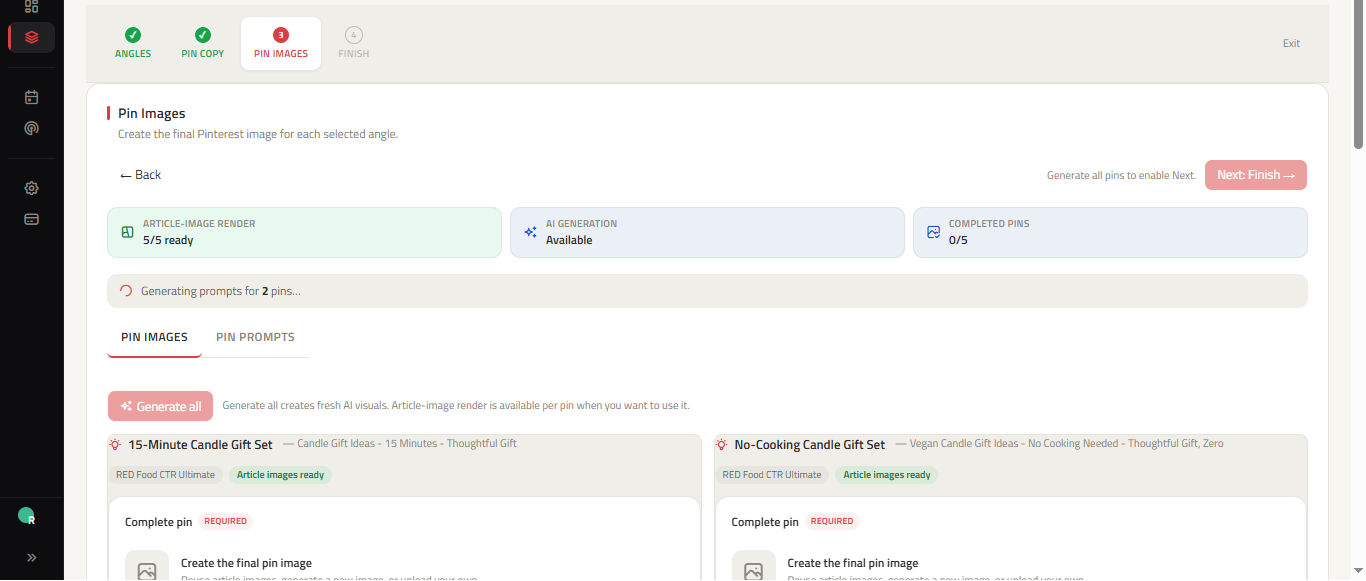
Once a keyword has a place in your plan, continue in the Workspace. Start with the article content that answers the searcher's query, then generate multiple distinct Pin directions using the Pinterest Pin Generator and fine-tune your messaging with coordinated Pinterest Pin Copy. ClickToPin keeps manual Pinterest posting intentional so you remain in full control of your publishing schedule.
A practical keyword research workflow
- Choose a seed topic: Start with a core product, service, customer problem, or seasonal theme.
- Search in Radar: Review related search language, intent clusters, and opportunity signals.
- Filter for fit: Keep only terms that align with your actual website content and commercial goals.
- Queue in Planner: Add approved topics to your publishing schedule.
- Create articles and Pins: Generate destination content and 5 distinct Pin angles for each topic.
- Review and post: Verify Pin titles, descriptions, and visual hierarchy before manually publishing.
Frequently asked questions
Is Pinterest keyword research different from Google SEO?
Yes. Google searchers are often looking for quick answers or specific websites, while Pinterest users are planning future projects, seeking visual inspiration, and shopping for solutions. Pinterest keyword research emphasizes visual search intent, guided search pills, and seasonal timing.
Can I do free Pinterest keyword research?
You can perform free basic keyword research directly in the Pinterest search bar by typing a seed phrase and reviewing guided search tiles and autocomplete suggestions. ClickToPin Radar automates and organizes this discovery process by extracting live search evidence directly into your content planner.
Where should I place keywords on Pinterest?
Place your primary keyword in your Pin Title (ideally within the first 30 to 40 characters), naturally in the first sentence of your Pin Description, and on the image overlay text. Reinforce relevance by saving the Pin to a relevant board with a descriptive title and description.
What this tool does not claim
ClickToPin does not present Radar as an official Pinterest volume database, a ranking guarantee, or an unauthorized auto-posting tool. Treat results as research intelligence, combine them with your domain expertise, and make the final editorial decisions yourself.
Run live Pinterest keyword research
Start with one topic your business can turn into helpful content today. Research opportunities, organize your content plan, and create Pins that attract qualified organic traffic.